
Type it like a text. Nothing changes until you approve.
14 days free. No card needed. Made in Sydney.
Example: a manager types "Draft next week for Fig & Ember." The reply says 24 shifts are filled and 2 gaps need a check. The manager taps Approve. The roster is published and the team is told.
Drafts next week from what you need, covers sick calls and checks your rules. Nothing goes out until you approve.
14 days free · No card neededMade in Sydney. Roster data stored in Sydney.
See how Roz worksExample: Mia can't make the Thursday 7am shift. Roz suggests Jess, who is free and has barista skill, at 22 hours this week going to 28. The manager taps Approve. Jess gets an alert on her phone: shift offered, Thursday 7:00 to 13:00, can you take it? Jess said yes, and Thursday 7am is covered.
Drafts next week from what you need, covers sick calls and checks your rules before anyone sees it.
14 days free · No card neededMade in Sydney. Roster data stored in Sydney.
See how Roz worksExample: Roz drafts the Fig & Ember roster for next week, Monday to Sunday, for five staff. Roz checks 3 rules and flags 2 shifts that nobody can fill. The manager taps Approve and publish. The roster changes from Draft to Published, and Jess gets an alert in the Roz app: Next week's roster is out. You work Mon, Wed, Fri.
Roz drafts next week from what you need, covers sick calls and checks your rules. You approve with one tap.
14 days free · No card neededMade in Sydney. Roster data stored in Sydney.
See how Roz worksExample on a manager's phone. The manager types: 2 baristas Sat morning. Jess is off Tue. Roz replies: Next week is ready.
24 shifts filled, 2 gaps flagged. The manager taps Approve. Roz replies: Published. Your team is told. Then a staff member gets an alert: You're on Sat 7:00–15:00 at Fig & Ember.
Every staff member gets a profile the roster actually respects — built from patterns in your data, not a one-off setup form.
Jordan’s the one staff cluster around — they trust her to call it when a Saturday looks rough. She’s been carrying the new starters too: “Quinn asks me before she asks Vargas, which is fine but I’d rather she went straight to floor lead.”
Has a standing 6:45 Pilates Tuesday — would skip it for a real emergency, but don’t put her on Open Tue as the default. Her partner does daycare pickup Mon/Wed/Fri; she does Tue/Thu.
Quietly studying her Cert IV on Sundays. Don’t roster her Sundays unless you’re really stuck — and tell her why if you do.
Current, expired, in training.
Roz only rosters people who can do the shift.
And the times they politely avoid.
Daycare pickup, second job, the gym class she never misses.
Anything you’d tell a new manager about this person. Roz reads it and respects it like the rest.
Quietly studying her Cert IV on Sundays. Don’t roster her Sundays unless you’re really stuck.
Roz won’t put Jordan on a Saturday. Won’t pair two people who clash. Knows Amy prefers Downtown and has the certs for AM lead cover.
Built passively from the systems you already run + the conversations you already have.
Profile depth grows over time. Roz also surfaces dedicated screens for 1:1 reviews, goal tracking, and activity logs — so the profile keeps learning between rosters, not just from them.
Six everyday calls
Pick a situation. Watch Roz check the roster, ask you, then tell the team.
Initiator
Rachel (Vet Nurse) called in sick · 07:12
Trigger
Rachel's Fri 08:00–16:00 surg AM is unassigned. Roz detects the gap and opens a chat.
Gap
Candidates
Roster mutations & comms
Initiator
Manager — asks Roz to put Sam on Sun open
Trigger
Adding Sun would be Sam's 7th consecutive day, past his 5-day pref cap and the award's 6-day max.
Sam — week so far
Alternatives
Rules fired & resolution
Initiator
Manager — asks to put Dr Patel on Tue surgery
Trigger
Dr Chen is on planned leave Tue. Patel's surgical certification lapsed 11 days ago — she can consult but not run a solo surgical list.
Cert ledger
Workaround
Cert check & resolution
Initiator
Roz · proactive sweep, ahead of publish
Trigger
Sat PM floor is three trainees and no Floor lead. Vargas is on her requested off day; the rest of the senior pool is unscheduled.
Sat PM as drafted
Best swap-in
Coverage check & resolution
Initiator
Lopez (Westside) called sick — 07:48
Trigger
Westside Thu AM drops below min cover of 2 (only Park on). Downtown has Chen + Garcia; Garcia is cleared for cross-site.
Site status (Thu AM)
Move
Min-cover restore & comms
Initiator
Time gate · 06:18 · Marek hasn't clocked in
Trigger
Marek's 06:00 open is 18 min unstarted. Door opens 06:30. Lina is rostered on at 06:30.
Cost shape
Outbound
Live events & resolution
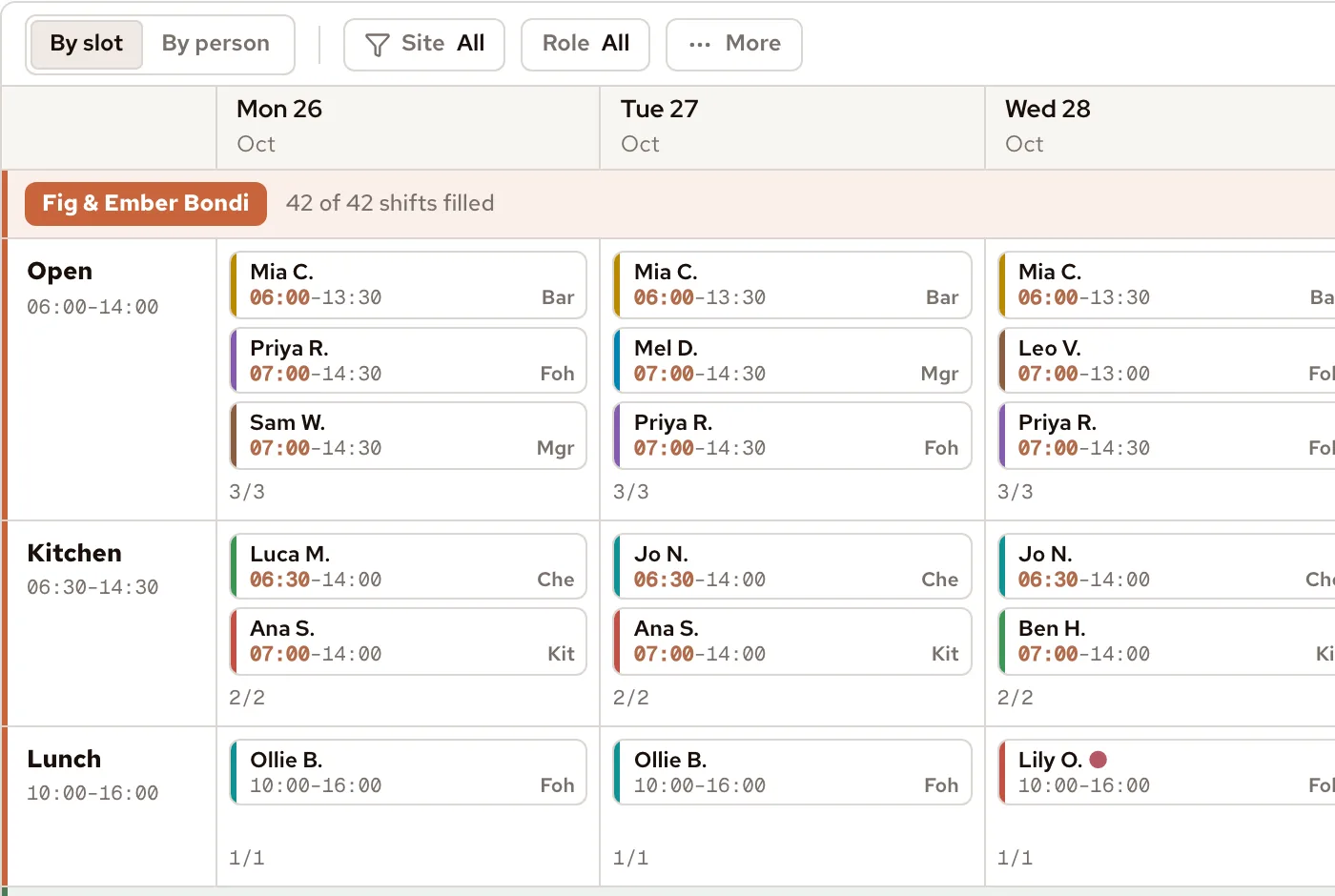
See the roster by slot or by person, for one week or up to eight. Every day keeps its own column. Staff hours, fairness and cost sit under the grid.
Build a 7, 14 or 28-day roster once, then apply it to any dates. Weeks with no roster yet show as blank columns.
Roz reads the rostering system you have, talks to staff on the channels they already open, and lives next to your calendar. Nothing to migrate, no exports.
Talks to your staff on the channels they already open.
 WhatsApp
 Telegram
 Email
Email SMS
SMS iMessage
 Microsoft Teams
 Slack
SlackReads the roster you already run — and writes the changes back.
 Deputy
 Employment Hero

Puts shifts on the calendar staff already check each morning.
 Google Calendar
 Outlook
 Apple Calendar
Sends hours to payroll with award rules applied.
 Xero
Xero MYOB
MYOB
 ADP
ADPTakes requests when your hands are full.
 Siri Shortcut
 Google Assistant
 Phone-in line
Signs your team in with the identity provider you have.
 Google Workspace
 Microsoft 365
 SAML (Pro+)
Don’t see your tool? Tell us — we add the ones customers ask for.
No setup forms. Snap the roster you use today — Roz rebuilds it in under a minute, then sets up your staff, sites, roles and rules for you to check.
Take a photo of the roster on the wall. Or upload a spreadsheet or PDF.
The same shifts and people, now in a roster you can edit, in under a minute.
Names, roles, hours and quals for each person on the roster.
Rest caps, the quals each job needs, and minimum cover.
Check what Roz built, change what you want, then publish.
Unlimited management users on every plan. 14-day free trial, no card required. Cancel any time.
Fourteen days. No card. Import your current roster — a spreadsheet, PDF or even a photo — and Roz builds week one in under a minute.
By starting your trial you accept our privacy policy. No spam. Cancel any time.
Prefer a hand getting set up? Book a 30-min setup call